This utility fetch realtime datafeed from NOW, NEST, TRADETIGER to Excel and pull it into AmiBroker.
EXCEL2AMI FREE SETUP INSTRUCTIONS:
When
you run software you will see disclaimer. Click on OK to accept it.
After
accepting disclaimer, you will see screen as shown above:
We will
explain process to fetch data from Nest Terminal to Excel sheet.
Run NEST
Trader and right click on the market watch. Select Link to Excel
and All Items.
Now
open Excel and paste on the very first cell.
You will see
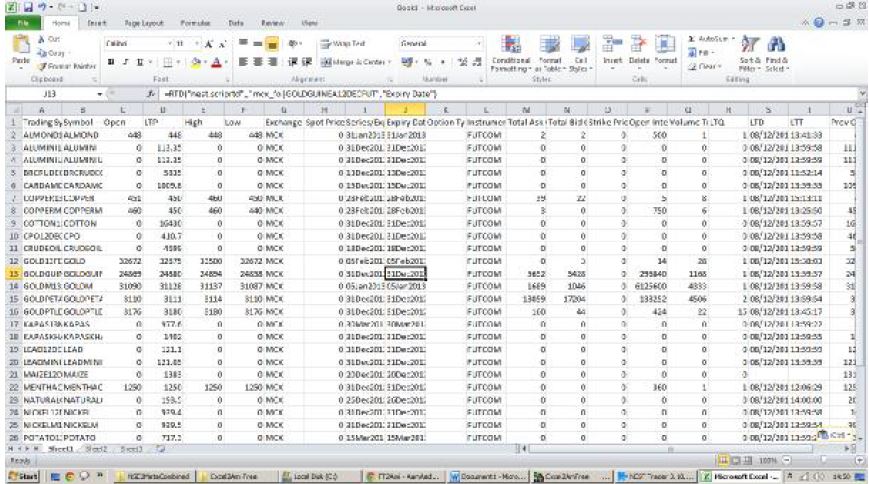
all the columns details and rates in Excel. If they are into
coming then
you need to contact your broker and get this feature
enabled.
Once you get
all the columns and data in excel, Select LTD column and set
it’s format
to Date and dd/mm/yyyy as shown below:
Similarly
you need to set the format of LTT column to Time as HH:MM:SS
as shown
below:
Save this
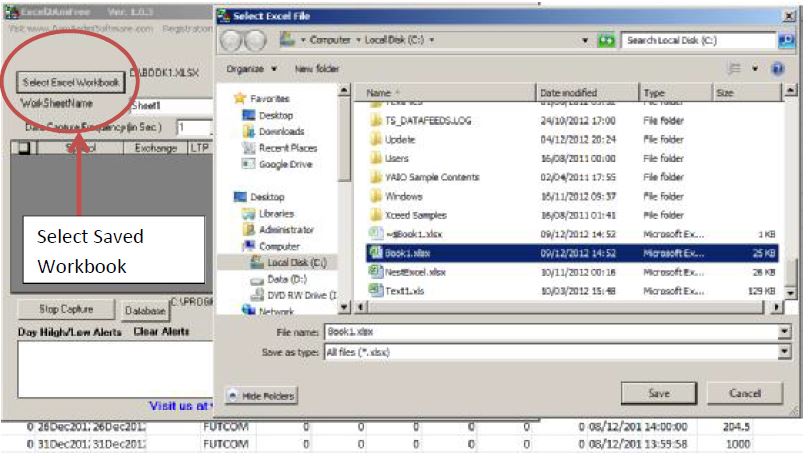
Excel file as C:\Book1.xlsx. You can save it with any name and
any
location. You need to select the same file in Excel2Ami Free by Clicking
Select
ExcelWorkbook as shown below:
Make sure
that name of the worksheet is same as mentioned in excel
workbook. It
is case sensitive. So be careful:
Now you are
ready to capture data from excel sheet. Click on Start
Capture. If
essentials columns are missing in your market watch of your
terminal
then you will see message like this:
After adding
all the required columns click on OK on the message
displayed.
You should see rates in Excel2Ami software.
This
is all what is required to get data from Excel to Amibroker.